What is 404 error
Hi friends, this time the topic is What is 404 error in Blogger/blogspot Blog and how to fix it. A 404 error(Not found error) tells search engine and users that the url you have typed is not found on this blog. the reason is it may be deleted by the Blog owner or having other issues. A blogger must fix this issue in his/her Blog since it will create negative impact among visitors.
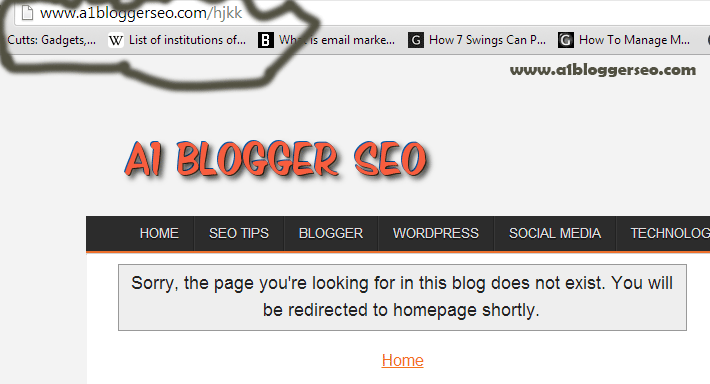 |
| 404 error in Blogger |
How to See 404 error in Google Webmaster tools
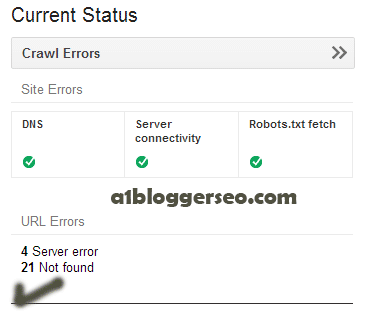
You can easily see a Website/Blog’s not found error (404) error in Webmaster tools. all you need is to add your website in the Google Webmaster tool. If you have a Blogger blog then you don’t need to add your site in Google Webmaster tools since by default Blogger’s blogs are added. how ever you can Submit sitemap in webmaster tools for the better result. So open the webmaster tools by sign in with your Gmail id and password. Now click on Blog url for which you want to see 404 error. Now click on Crawl errors you can see the total number of urls on your Blog with 404 error.
How to fix not found (404) errors in Blogger
Probably the 404 page error will not make a good impression of your blog among the regular users or new visitor. because it will make him frustrate by clicking on back button or to close the window. The best method to redirect not found page to a custom page is using Javascript code. so let’s use this code to overcome this problem.
Follow the steps to redirect not found pages in Blogger
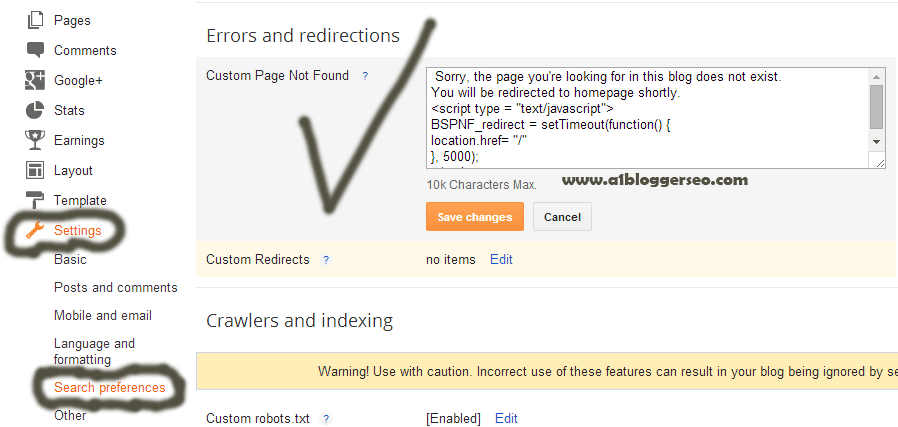 |
| Redirect 404 error in Blogger |
- Go to Blogger Dashboard
- Select your blog and click on setting
- Click on search preferences
- Now edit on custom page not found option
- Now you just need to paste the below java script code and click on save changes
Sorry, this page does not exist on A1 BLOGGER SEO.
You will be redirected to homepage shortly.
<script type = “text/javascript”>
BSPNF_redirect = setTimeout(function() {
location.href= “/”
}, 5000);
</script>
You will be redirected to homepage shortly.
<script type = “text/javascript”>
BSPNF_redirect = setTimeout(function() {
location.href= “/”
}, 5000);
</script>
- The above code is to redirect on Homepage if you want to redirect on another page, just change / in the “/” section and put your desired url extension. How ever you can also change the message by editing the page.
You have done. Don’t forget to share my post and ask for the question if you have any in the Comment section.