Easy way to Embed Google Maps in Responsive Websites/Blogs
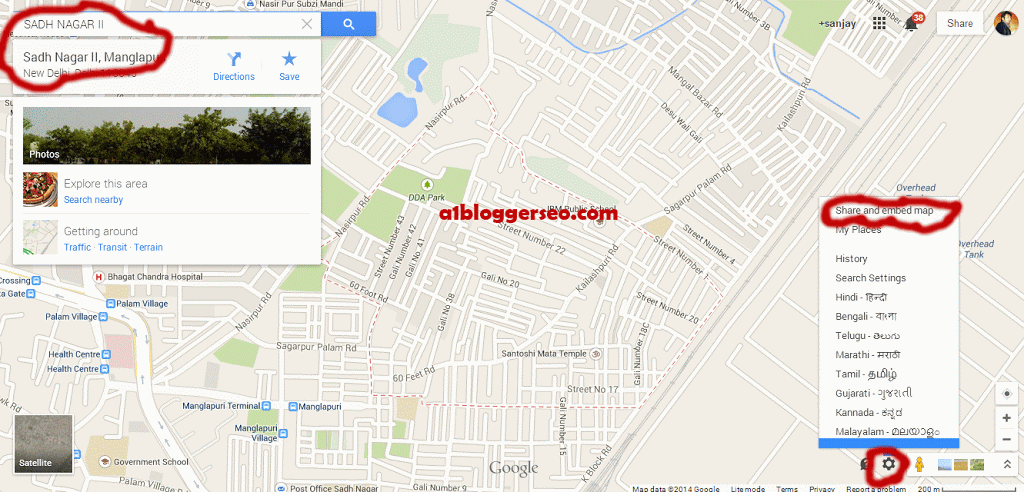
How to Embed an area in Google Map :
- Open Google Map
- Search the Business Place
- Select the exact business/place
- See in right bottom section there is a gear icon Click on that
- Now Click on share and embed map
- Now click on Embed map and copy the codes thats it.
Make Google Map Embeds responsive :
.google-maps {
position: relative;
padding-bottom: 75%; // This the aspect ratio you can change
height: 0;
overflow: hidden;
}
.google-maps iframe {
position: absolute;
top: 0;
left: 0;
width: 100% !important;
height: 100% !important;
}
</style><div class=”google-maps”>
<iframe src=”https://www.google.com/maps/embed?pb=!1m18!1m12!1m3!1d3503.3256130009395!2d77.08669500000002!3d28.590007000000007!2m3!1f0!2f0!3f0!3m2!1i1024!2i768!4f13.1!3m3!1m2!1s0x390d1b4247c48687%3A0xc65ac3fe8eb91f13!2sManglapuri!5e0!3m2!1sen!2s!4v1404496833842″ width=”600″ height=”450″ frameborder=”0″ style=”border:0″></iframe>
</div>
Note : This Seo Trick applies on all websites and blogging platforms like Blogger/Wordpress etc.
Thanks for being here on A1 Blogger Seo
Create and use .htaccess file to fix 301 error in a website
What is a .htaccess File :
.htaccess a file type which is used by seo experts for various issues occurred with a website. The most popular way to use a .htaccess file is for 301 redirection, that is to redirect non www url to www and www to without www. we just need to put some line of codes in a file and then we upload that on the server through ftp access. We upload the file in the same root where .index file is placed.
Recommended post : Know Meta tags
How to create .htaccess File
To create a .htaccess file please follow the below steps :
- Create a text document
- Paste the required .htaccess code
- Now click on save as
- write file name as .htaccess
- select all types in save as type option.
- Now click on save. the .htaccess file will be created.
![]() |
| Create .htaccess file |
.htaccess code to remove 301 error – non www to www or www to without www redirection in a website
Code for www to non www redirect
code for non www to www redirect
Thanks for being here. If you have any problem feel free to ask me in the comment section !!
Also know : How to fix /index.html error to home page in a website
: How to redirect Single/multiple Pages to another page in a website
How to Verify facebook page officially
![]() |
| Facebook verified Page |
What is Facebook Verified page
A Facebook verification is to show the official representation of that particular name.so that the people can understand the difference among the pages with same name. To know whether a page is officially verified page or not we can see the Blue color tick badge just after the page name.
Which type of Fb pages must be verified ?
Although there is request form from facebook is provided where you can go and claim to get your page verified but before that you can take some steps as i did for my page and got verified. you just need to maintain certain rules. Please note that your page must come under any of the following categories –
- Popular Brand
- Popular Business
- Player
- Politician
- Actor
- journalist
- Government Official
Steps to get a Facebook page or profile verified
To get your page verified you need to do some simple steps which are as follows –
- Your Profile/page must have some popularity since Facebook only verify popular brand, celebrity etc.
- You must need to give proper information in the about section of a page. try to fill all the required information with accuracy
- Link your page to the official website and also Link the website to your Facebook page.
- Go to https://www.facebook.com/help/contact/1448613808726619 and request them to get your page verified.
After doing the above process you just wait for a few months your page will be automatically verified by Facebook. if you have any query don’t forget to ask me in the comment Section. Thanq….
Remove Picture/Image shadow and Border in Blogger/Blogspot
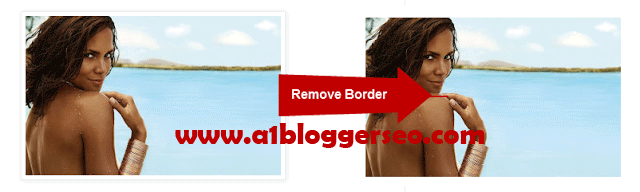
How to remove image border in Blogger
Please follow the steps to do this setting in your blog so that you will be able to post the actual images without any border in blogger.
- First of all download your blog template(This is for security purpose only)
- Now go to template and click on customize
- Click on Advance and then Add CSS
- Paste the following code and don’t forget to hit enter after the last line
.BlogList .item-thumbnail img {
padding: 0 !important;
border: none !important;
background: none !important;
-moz-box-shadow: 0px 0px 0px transparent !important;
-webkit-box-shadow: 0px 0px 0px transparent !important;
box-shadow: 0px 0px 0px transparent !important;
}
- Finally click on the Apply to Blog.
Now the blogger images which you gonna post should appear without any border.
Incase if you are unable to do the above process you just go to Dashboard >> Template >> Edit html >> Ctrl+f . Find the below code and delete it.
-moz-box-shadow: 1px 1px 5px rgba(0, 0, 0, .1);
-webkit-box-shadow: 1px 1px 5px rgba(0, 0, 0, .1);
box-shadow: 1px 1px 5px rgba(0, 0, 0, .1);
- « Previous Page
- 1
- …
- 19
- 20
- 21
- 22
- 23
- …
- 36
- Next Page »