
Easy steps to optimize Images in Blogger post for seo point of view

·

·

,
Optimize your all images in Blogger blog to improve visibility in Google image search result and get a huge traffic  from  there. We know people also search for the images so you need to do focus on it so that your images can appear in the search result. I know you often search for images in Google some times you feel  why your images has not seen in Google or other search engine search result. These all happened due to some mistakes in your blogspot blog. All you need is to do some seo while placing your images in the Blogger post.It is quite easy you need to follow these simple steps:

Steps to do before/while uploading an Image.

Read : How to add open graph meta tag in Blogger
 
  •  Always rename the image according to the  title: 

 One should  must rename the images when ever you download from the internet .You should give the image name according to the title of the page. When you are renaming an Image I will recommend you to give hyphen(-) between the keyword words. Like Optimize-Blogger-images

  •   Place alt tag in images:

it can be done when you upload an image, just click on the image after uploading you will see  property option on the top just click on it and change the alt tag and title text.
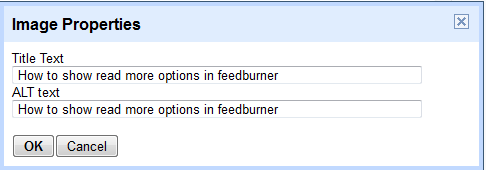
How to seo optimize Blogger images
Add title and test tag in Blogger for optimizuing images
 

  •   Put Captions in The images :
When you upload an image in Blogger post sinle click on it you will see an option for writinh captions, Must add a caption it helps google bot to easily read your images title.
  • Always Upload light weight images :
 Don’t upload any image from the internet by default. you should compress it so that it will not effect your blog loading time. you can compress images from picasa, Ms office picture manager, or from Adobe photoshop. You can do it it Adobe photoshop by clicking on save for web option from the Menu or simply press ctrl+alt+shift+s
If you have any issue, don’t forget to ask it in comment section…..!!!!


Leave a Reply

Your email address will not be published. Required fields are marked *

9 responses to “Easy steps to optimize Images in Blogger post for seo point of view”
  1. Ankit Kumar Singla Avatar

    Image optimization is really effective for better rankings and image search traffic. You have shared all the important points to optimize the images for web pages and for SEO.

    Bro I think you forget to create the hyperlink on
    Read : How to add open graph meta tag in Blogger

    Otherwise your Tutorial is great 🙂

  2. sanjay choubey Avatar

    Ankit brooo thanx to remind my mistake. Now Link is correct. Thank you for ur appreciation.

  3. Image optimization is a very important part of SEO we often overlook but when properly done can make a difference. As much as i use WordPress, i think same principle applies to them both.

  4. neenasatine Avatar

    thanks for this valuable post sanjay 🙂 worth sharing to social media especially for bloggers who use blogger platform.

  5. Ryan Biddulph Avatar

    Smart tips Sanjay. I create many more videos these days but when I use pictures I will keep these in mind.

    Thanks!

  6. sanjay choubey Avatar

    Thank you Nwosu for being here!!! this rule is also for wordpress too.

  7. sanjay choubey Avatar

    Thank you neenasatine for ur Valuable comment. yeah this is very useful for all blogging plaform

  8. sanjay choubey Avatar

    Thank you Ryan for being here. YEAH WE SHOULD KEEP THESE THINGS IN MIND. It helps us alot.

  9. Mubashir Bashir Avatar

    Hi Sanjay,

    Nice tutorial. I would add little out of my poor knowledge. I always try to add keyword in “alt tag” of image and I make image title little bit different from “alt tag” but closely related to keyword.

15 Years Experienced SEO freelancer
Call me at – 8802309980 or WhatsApp Now