
Admin/Author Box Below Every Blogger Post :
Hi friends, welcome to my New post, This post is all about placing an author box below each post in Blogger. Placing an Author/Admin below every post will increase your interaction with your readers since new readers can easily see your social profiles and can get connected with you. that is why this is a perfect widget for increasing overall blog traffic.
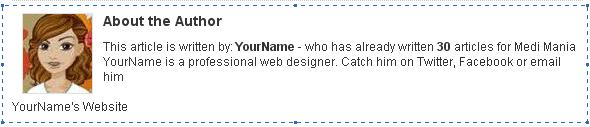
- Looks simple which can be used in every Blogger template
- Can customize own author Image
- You can also place the links for all social networks like twitter,facebook and Google+.
How to install :
- Go to Blogger Dashboard
- Click on template
- Click on edit html
- Press cntl+f and find the code ]]></b:skin>
- Now place the following code above it
.author_info { float: right; width: 573px; padding: 10px; border: 1px solid #e0e0e0; margin-bottom: 15px; margin-top: 15px; background: #eee; } .author_info h3 { margin-bottom: 10px; } .author_photo { float: left; margin: 0 0 0 10px; } .author_photo img { margin-right: 10px; border: 1px solid #e0e0e0; }
Again search for <div class=’post-footer-line post-footer-line-1′> and place the following code below it and then click on save.
<b:if cond=’data:blog.pageType == "item"’>
<div class=’author_info’>
<div class=’author_photo’>
<img alt=’author’ src=’http://lh3.googleusercontent.com/-AEjwZp9w37s/UNSIMPc2PcI/AAAAAAAAA7M/JjHAI3AjFFI/h120/images.jpeg‘/></div>
<h3>About the Author</h3> This article is written by: <b>YourName</b> – who has already written <b>30</b> articles for <a href=’http://sanjaychoubey.com/‘>YOUR-BLOG-NAME</a> Your Name . Catch him on <a href=’http://twitter.com/ersnjy‘ target=”_blank” rel=”no follow”>Twitter</a>, <a href=’http://www.facebook.com/a1bloggerseo’ target=”_blank” rel=”no follow”>Facebook</a> or <a href=’your e mail ID‘>email</a> him <br> </br> <br> </br>
YourName's <a href=’http://sanjaychoubey.com/’>Blogger tips</a><br style=’clear:both;’/>
</div>
</b:if>
<div class=’author_info’>
<div class=’author_photo’>
<img alt=’author’ src=’http://lh3.googleusercontent.com/-AEjwZp9w37s/UNSIMPc2PcI/AAAAAAAAA7M/JjHAI3AjFFI/h120/images.jpeg‘/></div>
<h3>About the Author</h3> This article is written by: <b>YourName</b> – who has already written <b>30</b> articles for <a href=’http://sanjaychoubey.com/‘>YOUR-BLOG-NAME</a> Your Name . Catch him on <a href=’http://twitter.com/ersnjy‘ target=”_blank” rel=”no follow”>Twitter</a>, <a href=’http://www.facebook.com/a1bloggerseo’ target=”_blank” rel=”no follow”>Facebook</a> or <a href=’your e mail ID‘>email</a> him <br> </br> <br> </br>
YourName's <a href=’http://sanjaychoubey.com/’>Blogger tips</a><br style=’clear:both;’/>
</div>
</b:if>
You need to change the urls as shown in red color, with your urls. and also you have to change the words and sentences which are in Blue colors with your own. Just customize it with your choice, and click on save. you will see the changes made. as a beautiful author box has started showing below each Blogger post. Thanks for giving your time. Take care.!
