

Do you know that one can easily customize his Linkedin Profile Url. If You haven’t done it then you should do it for better result and also it looks better.Recommended Post: Know How to Post in all groups in a single Click
A customized Url is easily Memorable to you and Your Contacts.
Easily Customize Linkedin Profile Address :
Follow the below Steps to make your own Custom url in Linkedin –
- Login to Linkedin
- Then Go to Profile
- Click on Edit Profile
- below Profile Image, You will see Your default Likedin url Click on Edit as shown in below fig.
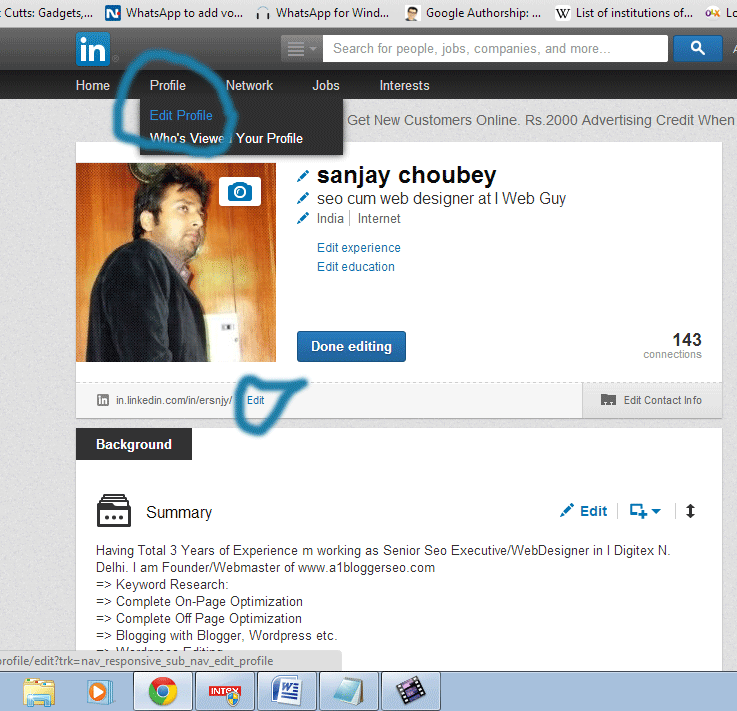 |
| Linkedin Custom url |
- Now you can see there is an option to Customize profile url Click on the option Customize your public profile URL as shown in the Figure.
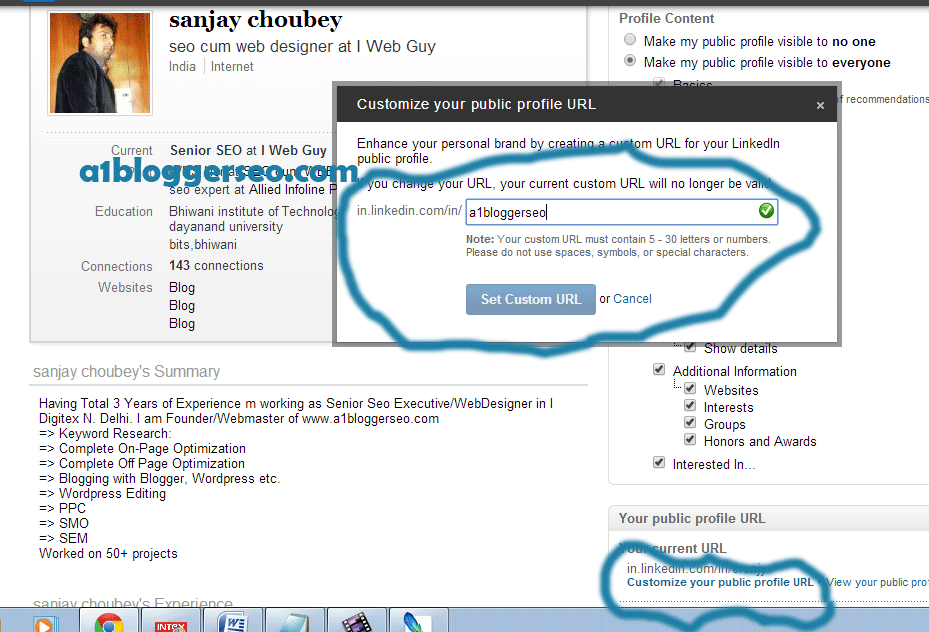 |
| Cusomization of Linkedin Url |
- Now Simply Set Your Linkedin Custom url as mine is http://in.linkedin.com/in/choubeysanjay
- Done..!! You can see your New Profile by Clicking on View Your Public Profile.


Leave a Reply